Browser-based PDF tools and WebAssembly: how no-upload processing works
2026-04-27 · 6 min read · onnova
You pick a PDF tool. You drag in a file. A progress bar moves.
The old assumption was simple: the file probably went to a server somewhere, got processed, then came back as a download.
Why should that be the default?
A browser-based PDF tool with WebAssembly changes the shape of the job. The file can stay on your device while the browser does the work locally. No server queue. No mysterious upload step. No need to trust a stranger's cleanup promise before you've even started.
The server became the default because browsers used to be smaller
For a long time, moving PDF work to a server made sense.
PDF files are not just flat pages. They can contain fonts, images, annotations, forms, compression streams, metadata, encryption, page trees, and a few historical quirks that nobody would design from scratch today. Parsing and rewriting that safely takes real code.
Older browsers were not a great place to run that code. JavaScript was slower. Browser memory was tighter. Heavy work could freeze the page. Shipping large document-processing libraries to every visitor was awkward.
So the industry did the obvious thing.
Upload the file. Process it on the server. Send the result back.
That model is easy for the service. It is not always great for the person with the file. The moment the PDF leaves your device, you have a new question: what exactly happened to it after upload?
Maybe the service deletes it quickly. Maybe it logs metadata. Maybe a temporary worker, storage bucket, CDN cache, crash report, or backup system saw enough to matter.
Maybe everything is fine.
Still, the trust surface got bigger.
WebAssembly made local processing more realistic
WebAssembly is not privacy magic. It does not sprinkle safety dust on a website.
It is a way to run compiled code inside the browser at near-native speed. That matters because a lot of mature document tooling was not born as JavaScript. It came from C, C++, Rust, and other ecosystems where low-level file parsing is normal.
With WebAssembly, more of that kind of work can run in the browser instead of behind an upload endpoint.
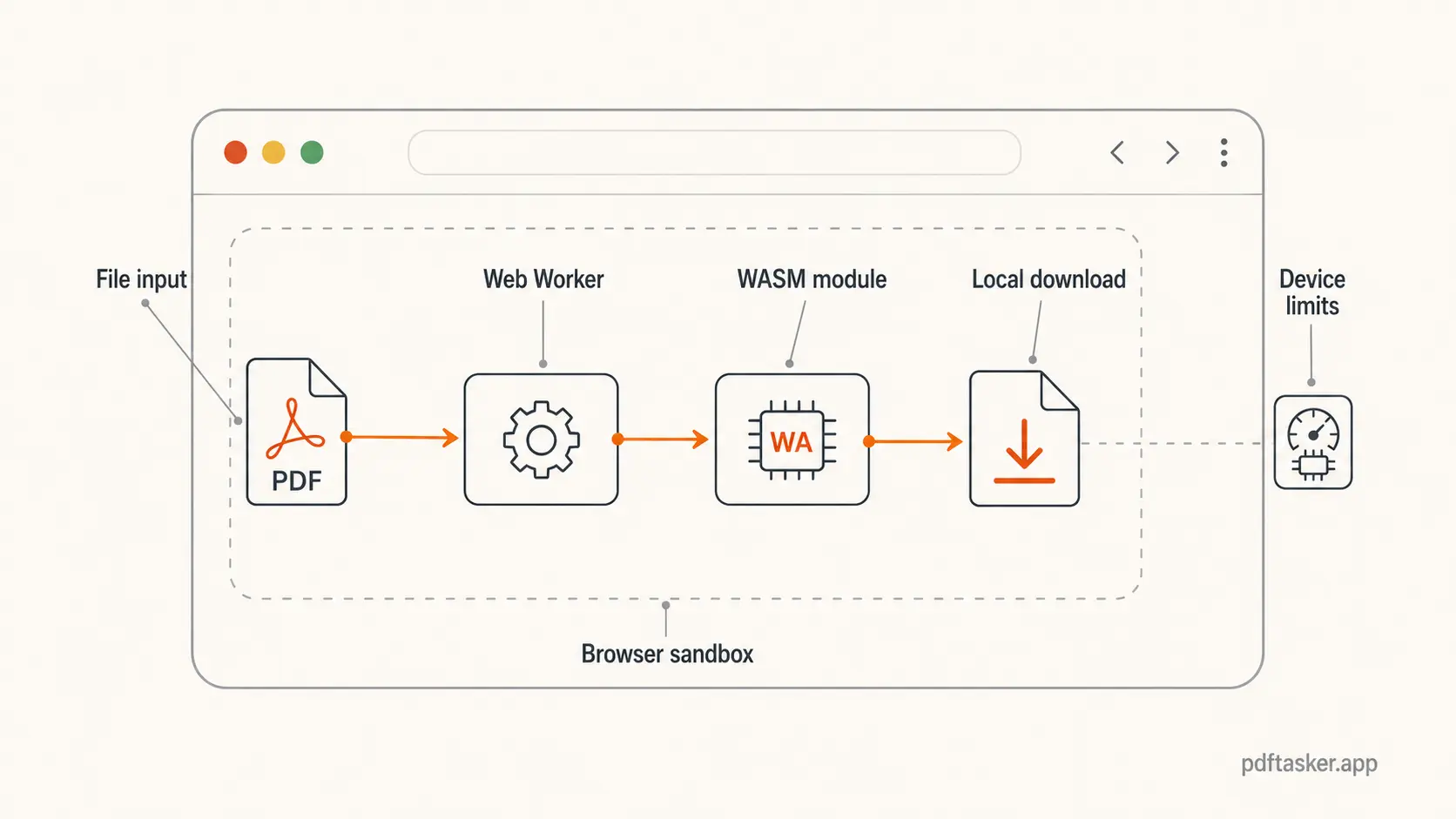
The browser still has guardrails. Code runs inside the browser sandbox. It can read the file you selected because you selected it. It cannot casually rummage through your disk. The result can be generated as a Blob and downloaded back to you.
That is the useful part.
No tricks. The work happens where the file already is.
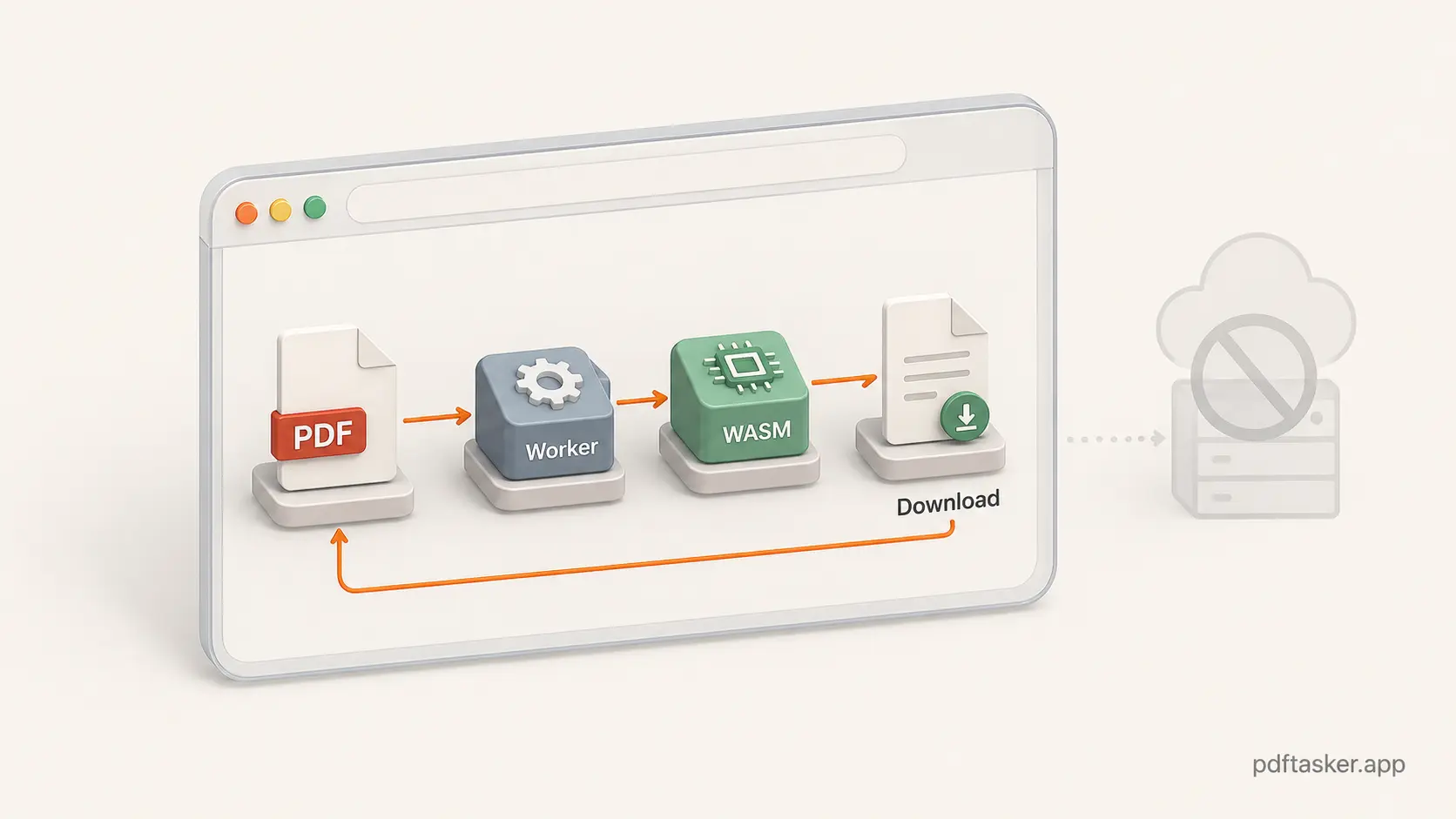
Web Workers handle the other half of the problem. Heavy PDF work should not make the page feel stuck. A worker lets the app move processing off the main UI thread, so the interface can keep showing progress, errors, and cancellation states while the document work runs in the background.
For PDFTasker, that browser-first shape is the point. The app loads as a static web page. The PDF work is handed to browser-side workers and client-side libraries. The output is created locally and downloaded.
That is a simpler promise than "upload now, trust us later."
Browser-only does not mean anything goes
Local processing has limits. Pretending otherwise would be marketing fog.
Your device still does the work. A 5 MB form and a 400 MB scanned document are not the same job. Browser memory, CPU, file complexity, and library support all matter.
Some PDF operations are also harder than they sound. Compressing a PDF is not one single operation. It might involve downsampling images, removing unused objects, rewriting streams, or deciding what quality loss is acceptable. Some files compress well. Some barely move.
That is why a serious no-upload tool should be clear about what it does and what it does not do.
The same honesty applies to privacy. A tool can use WebAssembly and still upload your file if the product is built that way. A tool can claim "browser-based" and still phone home with more data than you expected.
So do not judge by the buzzword. Judge by the file path.
Open DevTools if you care. Watch the Network tab while testing a throwaway PDF. Look for large outbound requests after you choose the file. Check whether the result appears without a document upload.
That is a better test than a soft privacy sentence in a footer.
How to evaluate a no-upload PDF tool
You do not need to audit a browser engine to make a practical call.
Use a small checklist:
-
Watch for outbound file requests. A no-upload flow should not send the PDF itself to a document-processing endpoint.
-
Check whether the tool works after page load. Some local tools can keep working once the app code is loaded. If every operation needs a fresh server round trip, ask why.
-
Look for worker-based behavior. Progress indicators, cancel states, and responsive UI during heavier jobs are signs that the tool is not doing everything on the main thread.
-
Read the limits. Good local tools admit file-size and browser-memory limits. Vague promises are not a feature.
-
Use the right job for the right tool. If you need to reduce a file before sharing it, try a browser-first PDF compressor. If you are handling sensitive files, also look at metadata cleanup before sending the final copy.
For a shorter side-by-side view, use the PDFTasker comparison checklist to compare upload behavior, processing location, account requirements, and browser limits before choosing a PDF tool.
This is also why PDFTasker keeps its product shape boring on purpose. The service is built around browser-side processing, static pages, and workers instead of a server-side document queue.
Not because it sounds fancy.
Because it removes a whole category of "what happened to my file after upload?" questions.
The boring architecture is the point.
The best version of a browser-based PDF tool is not theatrical.
You pick a file. The browser reads it. A worker does the heavy part. A local result is created. You download it.
That is it.
If the file does not need to leave your device, it should not leave your device. If a tool needs to upload it, the tool should say so plainly.
For everyday work like compressing, merging, splitting, signing, protecting, or cleaning metadata, the browser can now carry more of the load than it used to.
Use that. Keep the trust surface small.
PDFTasker
Compress